Free SEO Chrome Extension
Boost It Junior SEO Solution checks the page you are on in one click. You get a score out of 100 and a short list of fixes, most important first, each with why it matters and exactly how to fix it. No account, and the audit runs in your browser.
- Free
- No sign-up
- Works on any site
- Version 1.8
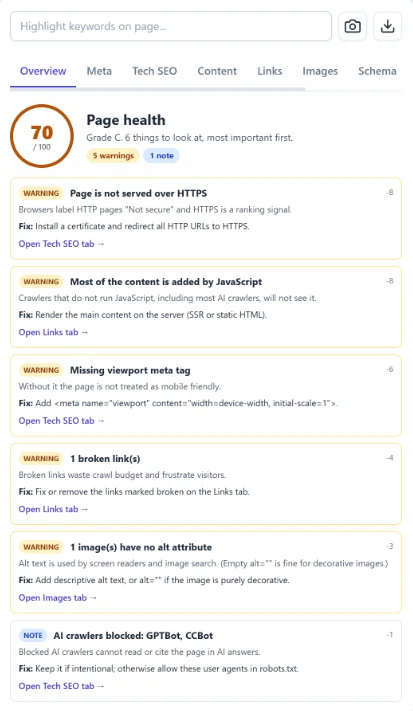
See it in action.
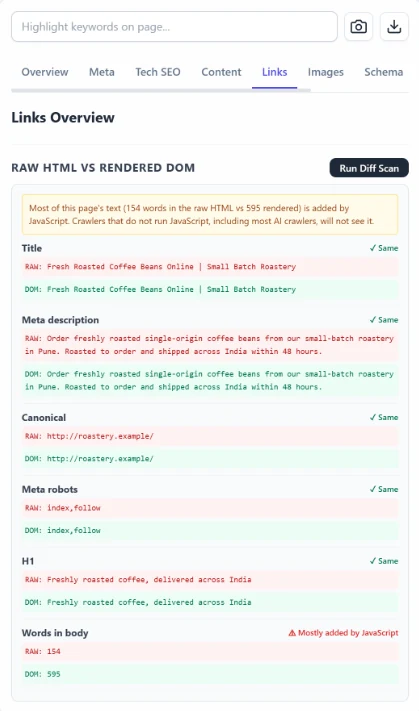
Click through the screens, or let them play. These are real screenshots of the extension checking a demo site.
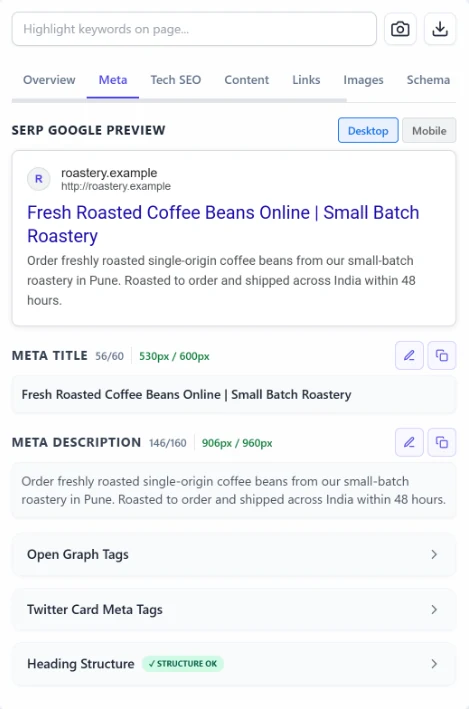
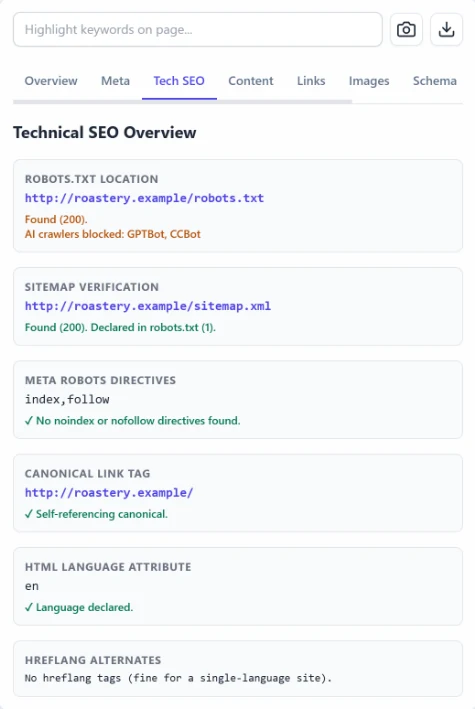
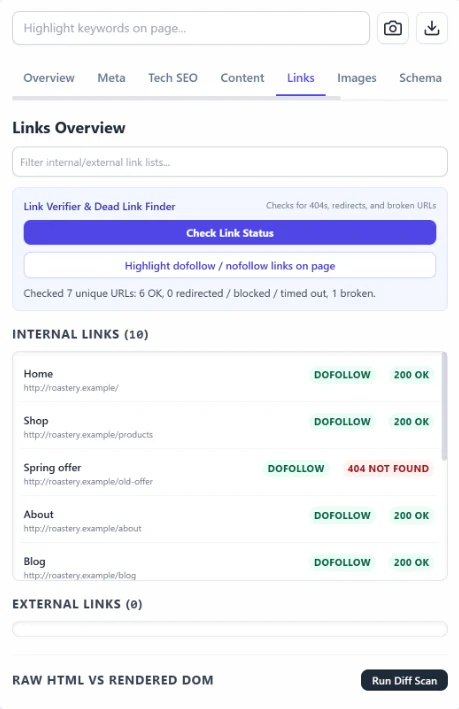
What it checks.
Everything below runs on the page that is open in your tab, whether it is your site, a client's or a competitor's.
Meta tags and headings
Titles and descriptions with length in characters and pixels, a live Google preview, Open Graph, Twitter cards and the H1 to H6 structure.
Technical SEO
robots.txt, the XML sitemap, meta robots and X-Robots-Tag, the canonical tag, hreflang and the viewport tag.
Links
Internal and external links with follow status, plus a one-click check that finds broken and redirected links.
Images
Which images have alt text, which have an empty alt and which have none, so you know what screen readers and image search get.
Structured data
The schema on the page, listed by type, so you can see what the page tells search engines about itself.
Content
Word count and readability for the main content, the quick check before you publish or rewrite a page.
Speed and stack
Loading speed, render-blocking resources and the technology the site is built with.
Raw vs rendered
What a simple crawler receives before JavaScript runs, compared with what your browser shows.
Keyword highlighter
Type a keyword and every place it appears on the page is highlighted, so you can see where it is used and where it is missing.
Three steps. About a minute.
No account to create and nothing to configure.
Add it to Chrome
Install it from the Chrome Web Store. It is free, with no sign-up.
Open any page
Go to the page you want to check and click the Boost It Junior icon in your toolbar.
Fix the top item
Start at the top of the fix list. Each item tells you why it matters and exactly what to change.
Private by design.
The extension does its work in your browser. It is not a front end for a server that collects the pages you check.
- Runs in your browserThe audit happens on your computer. Nothing about the pages you check is sent to us.
- No account, no ads, no trackingThere is nothing to sign up for, and the extension has no analytics.
- Asks before it reaches other sitesChecking links on other websites needs an extra permission. Chrome asks you first, and the rest of the extension works if you say no.
One page, or the whole site?
The extension checks the page in front of you. For every page on a site at once, use our free desktop audit tool.
| Chrome extension | Desktop audit tool | |
|---|---|---|
| Checks | The page open in your tab | Every page it can reach on your site |
| Runs on | Chrome, on any computer | Windows (64-bit) |
| Best for | Quick checks before and after you change a page | Full audits, site launches and client reports |
| Finds | A ranked fix list for one page | Broken links, duplicate titles and missing tags across the site |
| Price | Free | Free |
Questions.
Is it really free?
Yes. Every feature on this page is free, with no paid tier and nothing locked.
Which pages can it check?
Any normal web page open in a tab, including sites built with JavaScript. Like every Chrome extension, it cannot run on Chrome's own pages, such as settings or the Chrome Web Store.
Does it replace a paid SEO suite or a site crawler?
No. It checks one page at a time and has no backlink or keyword data. It is the quick check you run before and after you change a page. To crawl a whole site, use our free desktop audit tool.
Why does it ask for access to other websites?
Only the link checker needs it, because it has to request the addresses your page links to. Chrome asks you the first time. You can say no, and every other check keeps working.
Who makes it?
Boost It Junior, an SEO agency in Kolkata. Found a bug, or want a check added? Tell us.
Check your first page in the next minute.
Add to Chrome, free